

Training & SOPs
Your firm runs on what one person remembers
The Firm Operations Knowledge Hub is a structured home for how your firm actually works, built inside a system you already own — so the process survives the person who knows it.
SourcePro Consultants builds a Firm Operations Knowledge Hub inside a system the law firm already owns: a structured, role-based home for firm-wide best practices and standard operating procedures, each carrying its own onboarding checklist. Firms on Microsoft 365 get it built in OneNote at no additional software cost. Firms without a Microsoft suite get it built in whatever they already run — Google Workspace, ClickUp, or a free-tier wiki — and the recommendation always starts with what the firm already pays for. Pricing starts at $2,000.
What this looks like on an ordinary Tuesday
- Someone is out, and a matter stops — because the next step lived with them.
- A new hire is trained by whoever is free that week, so the third hire does the job a third way.
- An exception made once, for one client, quietly became the process.
- Nobody can say which version of the checklist is the current one.
- The answer to “how do we do this” is a person’s name, not a place.
What it costs while it stays in someone's head
Every hire starts from zero
There is nothing to hand someone, so the training is a person’s time and attention, repeated in full each time.
Handovers take months
Not because the work is hard, but because the only copy of it is being recalled out loud, in fragments, as situations come up.
It leaves when they leave
Notice periods do not transfer judgment. What goes is the reasoning behind the steps, which is the part nobody thought to write down.
It gets more expensive the longer it waits
Undocumented processes accumulate exceptions. The longer it runs on memory, the more there is to untangle before any of it can be written.
Does your team know the full lifecycle of a case — how it arrives, who touches it at each stage, and what has to happen before it closes?
Not the part each person owns. The whole path. Ask three people to describe it and see whether you get the same answer three times. Most firms do not, and the gaps are not where anyone expects them — they are in the handoffs, where everyone assumes someone else is covering it.
If nobody can describe it end to end, that is the problem. Everything below is what it costs and how it gets fixed.
“Sit with her for a week and you’ll pick it up”
This is how most firms train, and it is not a training method. It is a hope that watching someone competent will transfer what they know. It rarely does — not because the trainer is bad at their job, but because doing the work and teaching it are different skills, and the better someone is at the first, the less of it they can still see.
The expert cannot see what they know
Once a process becomes automatic it stops being conscious. The most tenured person genuinely does not notice the steps they skip, because to them those steps are not steps. Researchers call it the expert blind spot, and it is why the gap only ever surfaces later, as a mistake.
Nobody can watch and record at the same time
Taking notes while someone moves between screens splits attention in two directions, and the notes lose. What arrives back at the desk is fragments, out of order, with the reasoning missing.
There is nothing to go back to
A demonstration happens once. When the question comes up three weeks later there is no version to check — only interrupting the same busy person again, or guessing.
Nobody is accountable for what was covered
There is no record of what was taught, so there is no way to separate a gap in the training from a gap in the person. That distinction matters a great deal to whoever is being held responsible for it.
Why I build these
I was trained this way. I sat beside the person who knew, tried to write things down while she moved from screen to screen, and went back to my desk with scattered notes and no idea how to take a matter from end to end.
It was not until I was held accountable for a missed deadline that I understood the firm had considered that training. And I could not point at their star player, because I could not prove I had never been taught that one thing. I only knew that I did not know it.
So I built the first one for myself, in OneNote. One place where the whole process lived, in order, that I could search at the moment I needed it instead of having to remember to ask.
What the research says this is worth
Documentation is easy to treat as housekeeping. The measured cost of not having it is the reason it is not.
19%
of the working week
Professionals spend roughly a fifth of their week hunting for internal information or tracking down the colleague who knows. That is the single largest recoverable block of time in most firms.
McKinsey Global Institute, The Social Economy
up to 35%
of that time recoverable
The same study estimated a searchable internal store cuts information-searching time by up to a third — about 6% of the week handed back to every person on the team.
McKinsey Global Institute, The Social Economy
82%
better new-hire retention
Organizations with a structured onboarding process retain new hires at materially higher rates and report over 70% better new-hire productivity than those without one.
Brandon Hall Group
12%
get onboarding right
Only about one in eight employees strongly agrees their organization does a good job of onboarding. The bar in your market is low, and it is beatable with documentation alone.
Gallup
In law specifically, the ABA Journal puts the cost of losing a single lawyer at $200,000 to $500,000 once recruiting, onboarding and lost productivity are counted, and replacing a salaried staff member is generally reckoned at around 30% of their annual salary. A firm does not need to prevent many departures — or shorten many ramp-ups — for documentation to pay for itself.
These are published benchmarks from outside this firm, not results we are claiming for our own clients.
Why “we should write some SOPs” doesn't fix it
A written procedure is real work and real value — we sell exactly that, on its own, for firms that need one. But a document in a shared drive is not a system. What is missing is not the writing. It is the structure, and the place it lives.
What most firms try first
A written SOP on its own
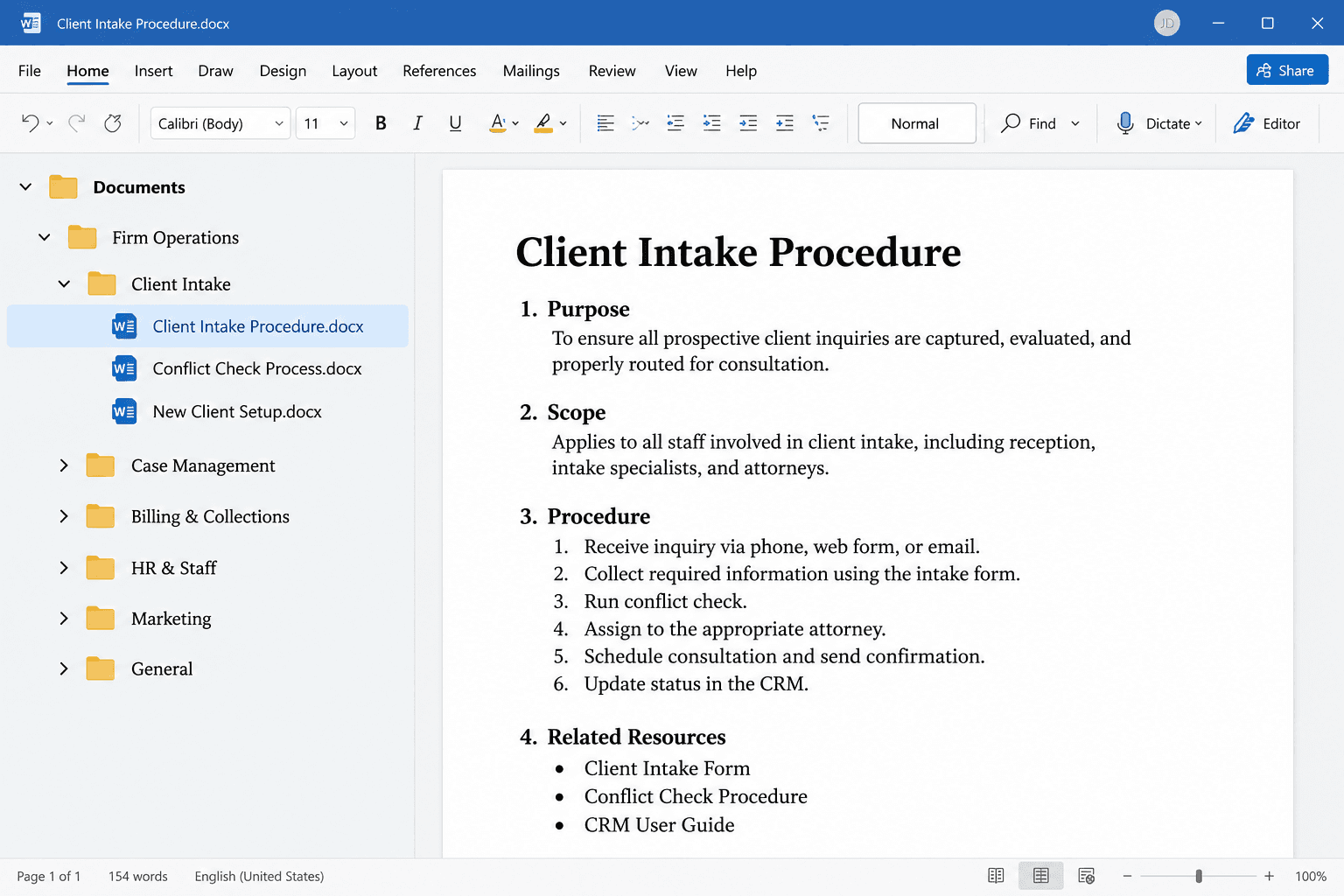
- Sits in a shared drive, in a folder someone chose once
- Nobody knows it exists unless they already knew to look
- Not attached to a role, so nobody owns keeping it true
- Stale within a quarter, and nothing surfaces that it is stale
What gets built
The same procedure inside the Hub
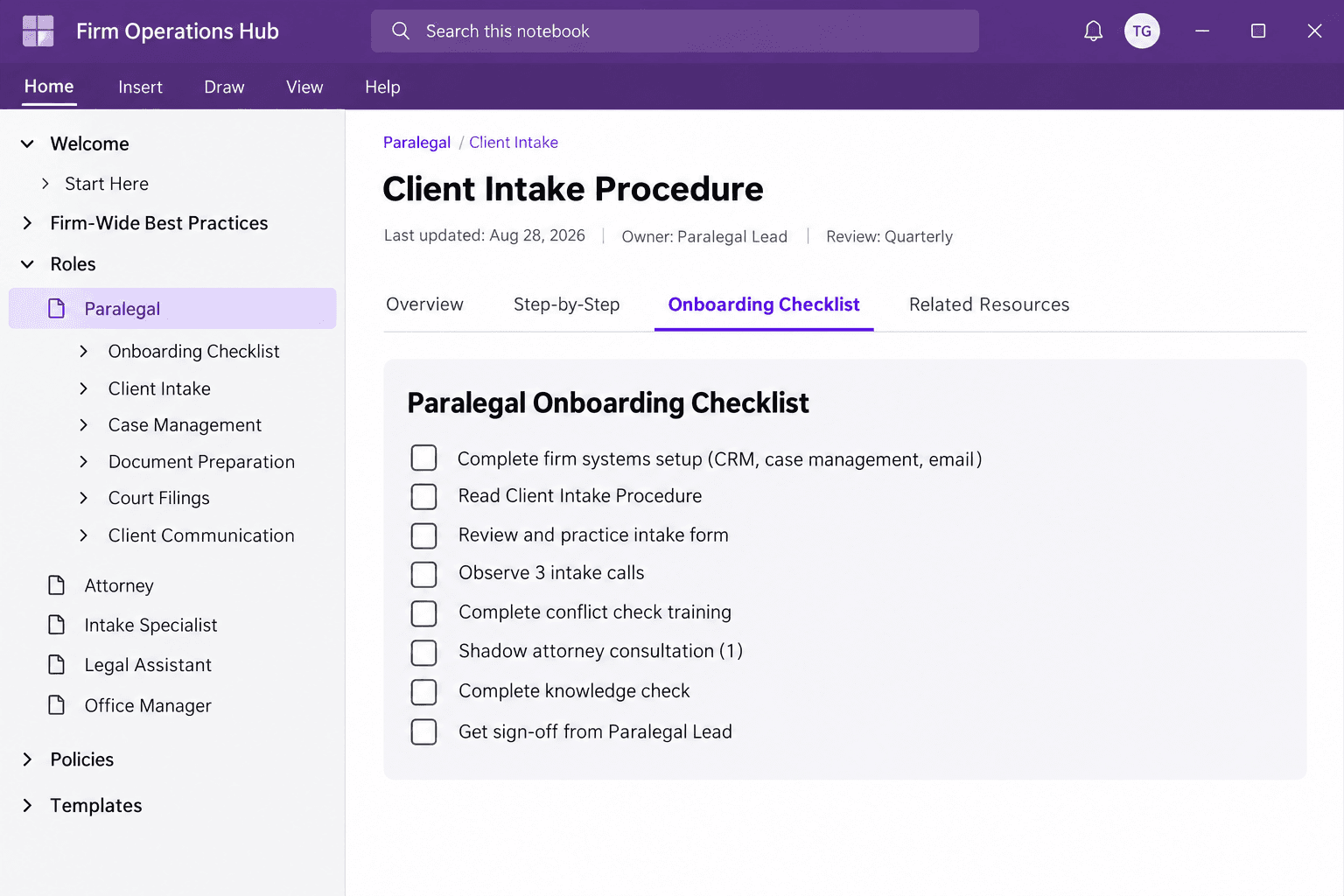
- Sits in a category structure that matches how the firm divides work
- Attached to a role, so the person in that seat is pointed at it
- Carries its own onboarding checklist for whoever is next in the role
- Has an owner, a place, and a reason to be reviewed
What a standard operating procedure actually is
A standard operating procedure is a written record of how one repeatable task gets done in your firm — who does it, in what order, which decisions they have to make along the way, and what to do when it does not go to plan. One procedure covers one process, from a defined starting point to a defined finish.
What it is
One process, start to finish
It begins at a specific trigger and ends at a specific outcome. Not a department, not a role — one path through the work.
Written for the person doing it
Detailed enough that somebody who has never done it can do it correctly without stopping to ask a question.
It includes the decisions
Real work forks. A procedure that only describes the happy path is abandoned the first time reality does not match it.
It names an owner and a review date
A procedure nobody owns goes stale, and a stale procedure is worse than none — people follow it and get the wrong answer.
What it is not
Not a policy
A policy says what the firm requires. A procedure says how it actually gets done.
Not a job description
A job description covers a person's whole remit. A procedure covers one task, which may cross several people.
Not a checklist
A checklist reminds someone who already knows the process. A procedure teaches someone who does not.
The sample below is a complete one, with a note on every section explaining why that section is there.
What a firm operations knowledge hub actually is
A firm operations knowledge hub is a structured, role-based home for a law firm's procedures, built inside a system the firm already owns, so the way work gets done survives the person who knows how to do it.
- Category architecture
- The shape of it, matched to how your firm actually divides work rather than to a template.
- A firm-wide best practices section
- The things that are true for everyone, in one place, instead of repeated differently in five.
- Role-based procedures
- Each carrying its own onboarding checklist, so a new hire in that seat has one place to start.
- An AI and confidentiality policy layer
- For firms where more people touch more matters and the rules need to be written down rather than assumed.
It is built in your own Microsoft 365 tenant, on your own licenses. SourcePro does not host it, and you keep it if we stop working together. If you are not on Microsoft 365 yet, that groundwork is Tech Infrastructure & Cloud, and it comes first.
What gets built
Scope follows the firm, not a package. How many roles you have, and how much already exists in writing, is what changes the size of the job — and that comes out of the Health Check.
- Category architecture built inside your own system
- A firm-wide best practices section covering what applies to everyone
- Role-based procedures, each with its own onboarding checklist
- Custom role branches where a seat does not fit a standard shape
- An AI and confidentiality policy layer where the firm needs one
- Discovery interviews, so the procedures reflect how you actually work
What changes once it exists
One process, the same for everyone
Everybody is accountable to the same written standard, so it stops quietly forking into three versions depending on who trained whom.
The team can suggest a better way
The people doing the work daily see the problems first. A Hub gives them somewhere to propose a change instead of privately working around it.
A rollout that outlives the email
The email announcing a new process is read once and buried. The Hub is where it lives afterwards, so the change survives the inbox.
Look it up instead of asking
When someone forgets the standard — and they will — they search the Hub. Nobody has to interrupt the busiest person in the firm for an answer that should be written down.
We build it in something you already own
The Hub is an architecture, not a product we license to you. It gets built wherever your firm already works — and we start with the option that costs you nothing new. We do not sell licenses: whatever it is built in, you buy it and you own it.
Microsoft 365
OneNoteNo new software costIf you are already on Microsoft 365, the Hub is built in OneNote inside your own tenant. Nothing new to buy, nothing new for staff to learn, and it sits beside the files it refers to.
Google Workspace
Google Sites and DocsNo new software costAlready on Google instead? The same structure is built with Sites and Docs on the licenses you already pay for. Different tool, same architecture.
If your firm already runs matters or tasks in ClickUp, the Hub can live in ClickUp Docs alongside them. The Free Forever plan includes collaborative docs and unlimited members, with a storage cap most firms only meet later.
A free-tier wiki
Notion, Nuclino or ConfluenceFree at small team sizesWhere a firm owns nothing suitable, there are genuinely free options. Nuclino is free for unlimited users with a cap on total documents; Confluence is free up to ten users; Notion has a long-standing free tier. Each stops being free at a different ceiling, which is worth knowing before you pick.
Purpose-built SOP software
Referral partnerTrainual, Whale or ScribePaid, and the last resortThese are good tools, and they are also the most expensive answer. Trainual and Whale both start in the region of $249 a month, and Trainual adds a one-time implementation fee. Scribe has a free tier and is genuinely useful for capturing click-by-click steps. We only recommend buying one of these when nothing you already own will do the job.
What a paid platform adds
Assignment, completion tracking, quizzing and reporting. None of that exists in a notebook or a free wiki — which is the honest reason to pay for one, and the only reason we would suggest it.
Third-party pricing above was accurate at the time of writing and changes without notice. We confirm current costs with you before recommending anything that is not already on your bill.
Where a tool is marked “referral partner”, SourcePro may earn a fee if you sign up through our link. It costs you no more, and it does not change the order of this page — the options that cost you nothing come first, and we earn nothing on those.
Investment
Starting at $2,000
- The final figure depends on how many roles you have and how much of the process already exists in writing. That comes out of the Health Check, not off a page.
- It costs less when it is built alongside a Customer Relationship Management or Case Management System engagement, because the discovery work is already happening.
- Additional procedure pages and short video walkthroughs are priced per item afterwards, so the Hub can grow without a new engagement.
Where the Hub sits inside a wider build, it is quoted as part of a Customer Relationship Management or Case Management System engagement rather than separately.
Training the team, in the room
A Hub tells you where the process lives. It does not, on its own, get a team to use it. For firms that want the handover done properly, we deliver the training on site — with your people, in your systems, on the matters actually in front of them.
Half days, up to three hours, start at $1,050. Book two or more consecutive days in the same engagement and every day after the first is 15% off. The exact figure depends on the size of your firm and how many roles are being trained, and it is quoted with the travel estimate before anything is booked.
This is always an add-on. It stacks on top of the remote sessions already included in your implementation phase rather than replacing any of them.

A set number of days, agreed before we start
Scoped against how many roles and processes there are to cover, then fixed on both sides. A prep call and an agenda build happen before the day itself, and delivery is usually two to three weeks from booking.
Built from your live systems, not a walkthrough
The agenda comes out of your actual workflows and the procedures we built for your firm. Hands-on exercises, role-specific breakouts where the work genuinely differs, and live questions from the people who will be doing it.
On site, with the people who do the work
Not a webinar and not a recorded course. In your office, up to fifteen staff in a session, with the paralegals, intake staff and attorneys who will be living inside the process.
Travel inside Georgia is included
It is already in the day rate. Outside Georgia, mileage, flights and lodging are invoiced separately at cost with no markup, agreed in advance along with the dates.
What you keep afterwards
- Updated quick-reference cards for every procedure covered on the day
- A follow-up email with the recap and the action items
- A recording of the session, if you want one
We do not train on what we did not build
On-site training is available for systems we implemented. We will not teach a team to work inside a configuration somebody else left half-finished — that trains people in the workarounds rather than the process, and it is not something we can stand behind. If you inherited a system and want it taught, the Health Check is where we find out what it would take to put it right first.
Keeping it current
An operations hub decays the same way an automation does — the exception nobody wrote down, the process that changed, the person who left.
- Additional procedure pages and video walkthroughs are priced per item, so the Hub can grow without a new engagement.
- Continuous ownership — reviewing what changed, retiring what is no longer true — is step four of the ladder, not part of the build.
- It is in your system, on your licenses. If we stop working together, nothing has to be exported or handed back.

Who builds it
15+ years of paralegal and legal operations experience, plus a full-stack software engineering background. I learned what actually breaks by auditing chaotic case management systems and interviewing frustrated paralegals — the people holding an undocumented process together.
Frequently asked questions
Start with a Legal Systems Health Check
A free 30-minute diagnostic. We look at how your intake, cases, and reporting actually run — and show you where the workflow is costing you.