Document Summarization: What Takes Hours Takes Minutes
By Teila Garraway, Founder and Principal Consultant
A discovery production lands on a paralegal's desk. 600 pages. A deposition transcript, three expert reports, and a stack of exhibits nobody's read yet.
An hour later, they've skimmed it, flagged the relevant sections, and typed up a rough summary for the attorney.
Then it happens again next week. And the week after that.
Contract review AI and document summarization tools exist to eliminate this exact bottleneck — but most firms either don't use them, or don't trust the output enough to actually rely on it.
The Cost of Manual Document Review
Manual document review shows up everywhere in a law firm, not just in one department:
Discovery productions get read page by page before anyone can flag what matters
Contracts get reviewed line by line to find risk clauses and non-standard terms
Depositions and expert reports get summarized by hand before case strategy meetings
Every one of these tasks takes an attorney or paralegal an hour or more, depending on document length
That time is spent extracting information, not analyzing it — the actual legal judgment doesn't start until after the reading is done
The business cost adds up fast:
Lost capacity: hours spent reading and summarizing are hours not spent on strategy, negotiation, or client work
Slower turnaround: cases and deals move at the speed of the slowest manual review step
Inconsistent output: two different people summarizing the same document produce two different summaries, in two different formats
Burnout risk: repetitive document review is consistently ranked among the least satisfying parts of legal work
Where AI Document Summarization Fits in the Firm
AI contract review tools and document summarization tools don't replace legal judgment. They replace the reading — the mechanical first pass through a document before any actual analysis can begin.
Before: A document arrives, an attorney or paralegal reads it start to finish, they extract key facts, dates, and risk points manually, they write up a summary in whatever format they personally use, this takes an hour or more depending on length.
After: A document is uploaded, AI extracts key facts, flags risk language, and generates a structured summary, what took an hour now takes about two minutes, the attorney reviews and refines the summary instead of building it from scratch, summaries are consistent in format across every document and every reviewer.
That's roughly 10 hours a week freed up per person doing this kind of review regularly — time that goes back into the parts of the job that actually require a legal mind.

Common Mistakes Firms Make With Document Summarization
Mistake 1: Buying the tool without defining what "summarized" means.
Contract review software and AI summarization tools all promise speed, but if nobody defines what a summary needs to include — key dates, risk clauses, party obligations — every output looks different and nobody trusts it.
Mistake 2: Treating AI summaries as final instead of a draft.
An ai contract review tool is strong at extraction and pattern recognition. It's not a substitute for legal judgment on ambiguous language or case-specific risk. Skipping human review on anything that touches strategy or client advice is a real liability.
Mistake 3: No workflow for where the summary goes next.
A great summary that sits in a folder nobody checks doesn't save any time. The summary needs a defined destination — case notes, a client update, a negotiation memo — or the automation only moves the bottleneck instead of removing it.
Mistake 4: Rolling it out across every document type at once.
The best ai contract review software for a 20-page NDA is not necessarily the right tool for a 600-page discovery production. Piloting on one document type first surfaces the gaps before they become firm-wide problems.
How to Implement Document Summarization
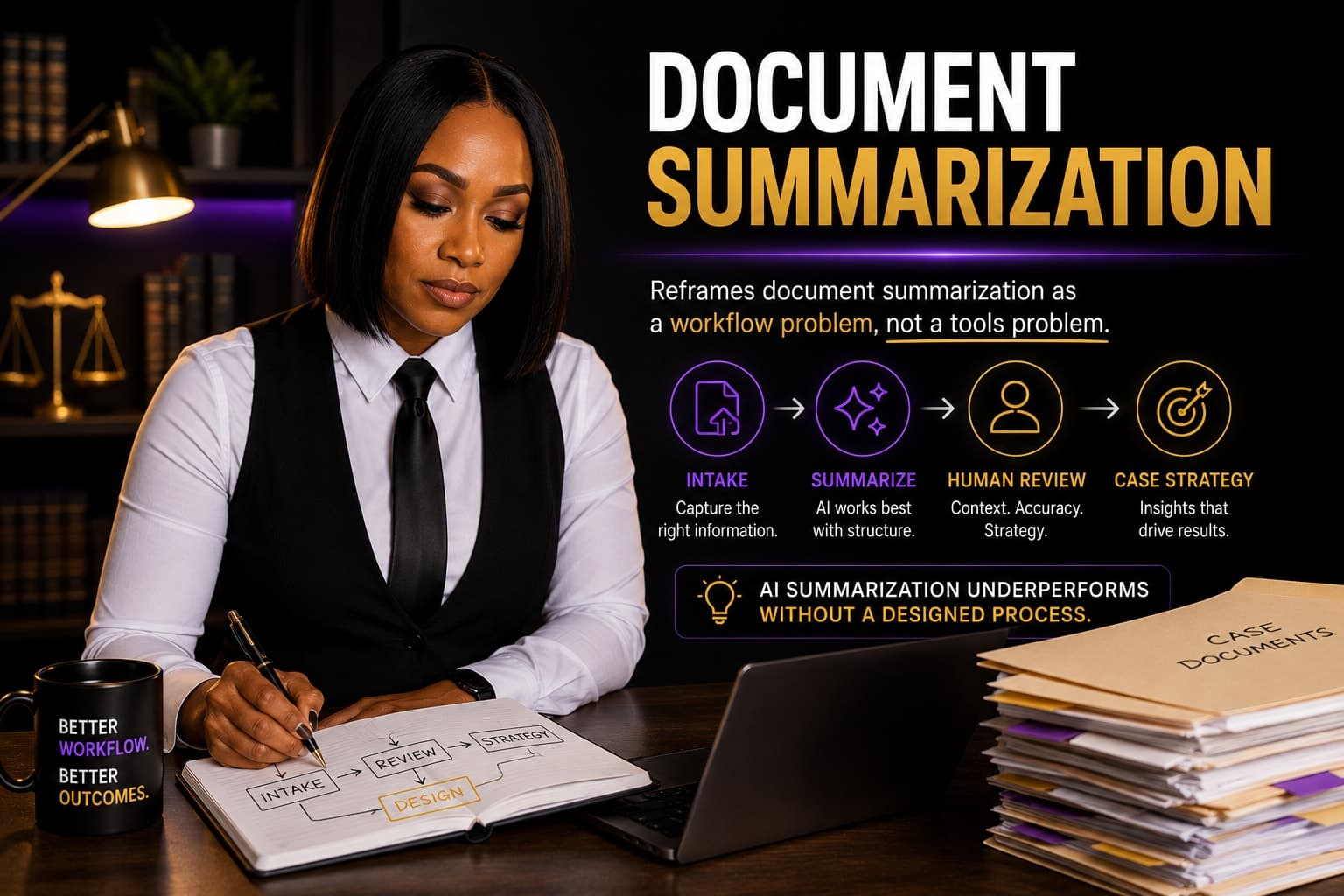
Define your summary standard. Decide what every summary must include — key dates, risk flags, obligations, parties — before you automate anything.
Pilot on one document type. Contracts, depositions, or discovery productions — start narrow, prove the workflow, then expand.
Assign a review step. Every AI-generated summary gets checked against the standard before it's used in case strategy or client communication.
Route summaries somewhere specific. Define exactly where the output lands — case management notes, a shared drive, a client memo — so the time saved doesn't get lost to a broken handoff.
Track the time savings. Measure hours per document before and after to prove ROI and justify expanding to more document types.
Reinvest the recovered hours deliberately. Freed-up time should go to higher-value work, not just get absorbed into a heavier caseload with no plan.

Diagnostic Questions for Your Firm
How many hours per week does your team spend reading and manually summarizing documents?
If you already have legal document review software available, is it actually integrated into how your team works, or does everyone still read documents manually out of habit?
Do two people at your firm summarize the same type of document the same way, or does it vary person to person?
What would your attorneys and paralegals do with 10 recovered hours a week if manual document review wasn't consuming them?
The Bottom Line
Document summarization is one of the clearest, most measurable places where AI automation pays for itself. Contract review AI doesn't replace legal judgment — it clears the reading bottleneck so that judgment gets applied faster, and to more matters.
The CRM is the tool. The system design is the product. If your team is still summarizing documents by hand, the software was never the problem — the workflow around it was.
Not sure how much billable capacity your team is losing to manual document review? Run the free Law Firm Realization Rate Calculator: https://tools.sourceproconsultants.com/realization-calculator/. Browse all free tools at https://sourceproconsultants.com/tools-resources.
Ready to see where document review is quietly costing your firm time? Book a Legal Systems Health Check: https://sourceproconsultants.com/legal-systems-health-check

Teila Garraway
Founder and Principal Consultant
15+ years paralegal and legal operations experience, plus a full-stack software engineering background.
About Teila →