

The 3-Layer Operating System: Why Most Law Firm Tech Stacks Fail Before They Start
By Teila Garraway, Founder and Principal Consultant
Most law firms don't have a tech stack problem. They have a layer problem.
Here's what I see walking into a new firm: five, six, sometimes eight tools running at once. A CRM. A case management platform — sometimes two. A calendaring tool bolted on the side. A reporting dashboard nobody fully trusts. Each one bought to solve a specific pain point, in a specific month, by a specific person who may not even be at the firm anymore.
None of it was designed. It accumulated.
The fix isn't consolidation for its own sake, and it isn't "buy the platform that claims to do everything." It's recognizing that every law firm operation — regardless of practice area or firm size — runs on exactly three layers. Get the layers right, and the tools underneath them become interchangeable. Get the layers wrong, and no amount of software spend fixes it.
This is the 3-Layer Operating System: the framework SourcePro Consultants uses to diagnose and rebuild law firm systems, and the one most firms are missing without knowing it exists.
What the 3-Layer Operating System Actually Is
The framework breaks law firm operations into three distinct functional layers. Each layer has a different job, a different owner, and a different tool logic — and treating them as interchangeable is where most law firm workflow management breaks down.
Layer 1: Intake
Job: Capture a lead, qualify it, and move it to retainer — or disqualify it fast.
This layer answers one question: is this a case we take? Everything here is built around speed and conversion. A lead sitting unassigned for 48 hours is a lead you're losing to the firm that called back in 20 minutes. Layer 1 tools are built for volume and follow-up cadence — not for managing an active case five months into litigation.
Layer 2: Case Management
Job: Move a signed client through the full case lifecycle — deadlines, documents, communication, task ownership — from retainer to resolution.
This layer answers a different question: where is this case right now, and what's next? Case management tools are built for depth, not volume. Deadline tracking. Document generation. Task assignment across a team, sometimes across years. None of that logic belongs in an intake tool, and none of the intake logic belongs here.
Layer 3: Reporting
Job: Pull visibility across both layers — where cases come from, what they cost to acquire and run, what they return.
This layer answers the question ownership actually cares about: is this working? Reporting isn't a dashboard bolted onto Layer 2 as an afterthought. It's a distinct layer that pulls data FROM Layer 1 and Layer 2 and turns it into decisions — which referral sources convert, which case types are profitable, where the bottlenecks sit.
Three layers. Three jobs. Three different tool logics. When a firm collapses two of them into one tool — which is the single most common mistake I see in law firm workflow software decisions — both jobs get done worse, not better.
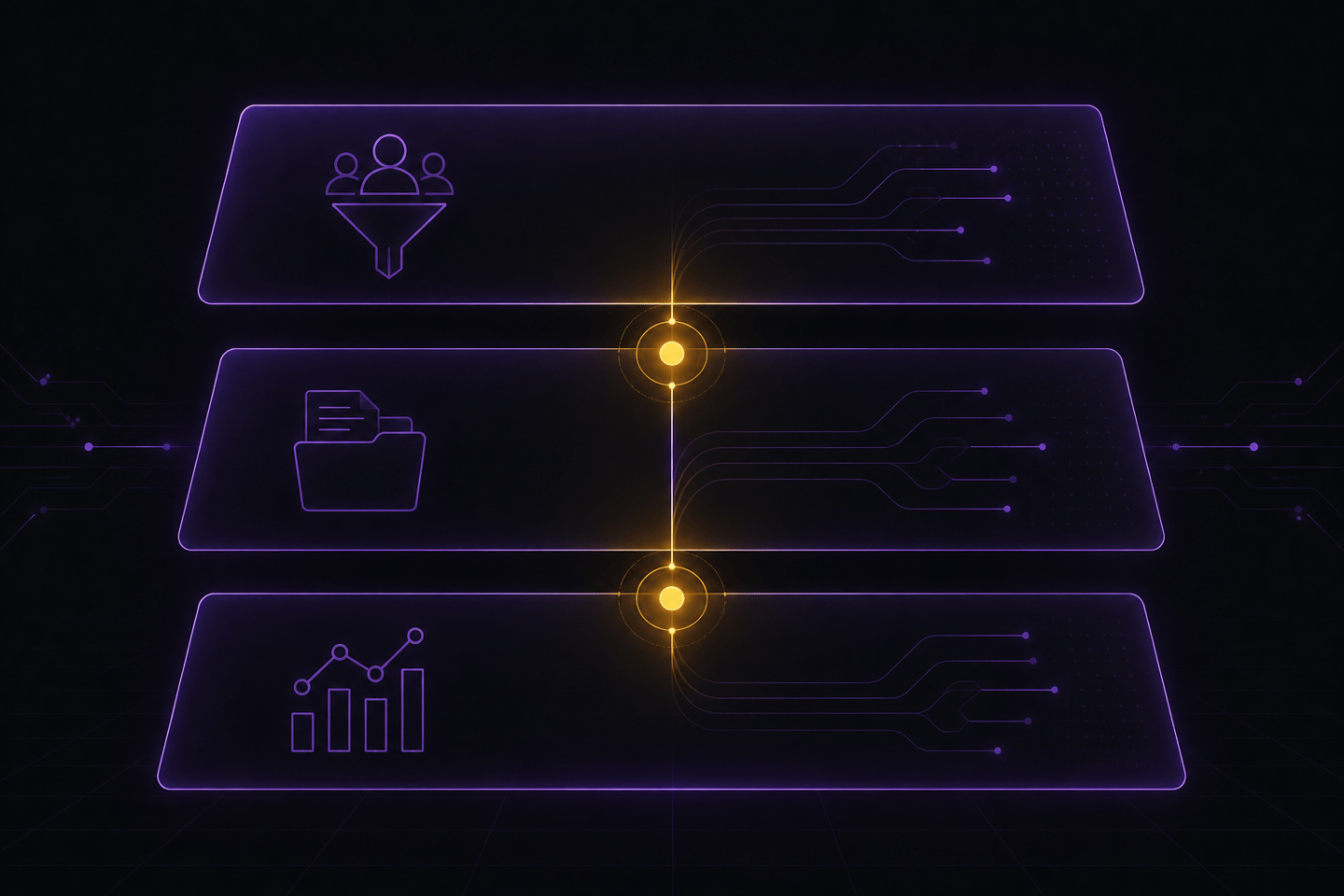
Where This Fits in Your Firm's Workflow
The layers aren't independent silos. They're connected by two handoff points, and those handoffs are where most firms lose control of their own operation.
Handoff 1: Lead → Client (Layer 1 to Layer 2)
The moment a lead signs a retainer, ownership needs to move — cleanly and immediately — from your intake system to your case management system. If that handoff isn't explicitly defined, one of two things happens: the case sits half-tracked in both systems simultaneously, or it falls into a gap where nobody owns it for the first week. That gap is exactly where deadlines get missed on brand-new cases, before anyone is even looking for them.
Handoff 2: Case Data → Reporting (Layer 2 to Layer 3)
As a case moves through Layer 2, it generates data — time to resolution, referral source, case value, attorney assigned, hours logged. If Layer 3 isn't built to pull that data automatically, someone is manually compiling it in a spreadsheet once a quarter, which means by the time you actually see the number, it's too old to act on. Reporting has a shelf life. Manual reporting is almost always expired by the time it reaches a partner's desk.
This is why the 3-Layer Operating System is not "pick three good tools and move on." It's designing the handoffs between them — the exact moment data crosses from one layer into the next — before you touch a single piece of software. Workflow architecture comes first. Platform selection comes second. Firms that reverse that order end up rebuilding within eighteen months.
The Common Mistakes Firms Make
Mistake 1: Buying tools in the wrong dependency order.
Firms buy a reporting dashboard before their case management data is clean enough to report on anything meaningful. Or they invest in an elaborate case management platform before intake is even capturing leads consistently. The layers have a strict dependency order — Layer 1 has to function before Layer 2 data means anything, and Layer 2 has to be clean before Layer 3 reporting is trustworthy. Skip the order, and you get an expensive dashboard reporting on garbage inputs.
Mistake 2: Collapsing two layers into one tool.
This is the CRM-doing-case-management problem I write about constantly, and it's the most expensive mistake on this list. A CRM is built to nurture leads to retainer — high volume, fast cadence, disqualification logic built in. A case management tool is built to move a smaller number of active matters through years-long timelines with dozens of deadlines each. Force one tool to do both jobs and adoption drops, because the tool is architecturally fighting itself on half its use cases. Your team feels this as "the software is slow" or "nobody uses it right." The software isn't the problem. The layer collapse is.
Mistake 3: No defined handoff owner.
Even with the right three tools in place, if nobody owns the moment a lead becomes a client — whose job is it to move the file, notify the assigned attorney, and formally close the loop in the intake system — that handoff happens inconsistently. Some leads convert cleanly. Others get lost in the gap between systems for days. The tool didn't fail here. The handoff was never assigned to a specific person with a specific trigger.
Mistake 4: Reporting built as an afterthought.
Firms treat Layer 3 as a "nice to have" they'll get to eventually, usually after a bad quarter forces the question. But reporting is what tells you whether Layers 1 and 2 are actually working in the first place. Without it, you're running a firm on instinct — and instinct doesn't catch a referral source that's quietly stopped converting, or a case type that's been unprofitable for a full year while everyone assumed it was fine.

How to Actually Implement the 3-Layer Operating System
Step 1: Map what you already have against the three layers.
Before changing anything, write down every tool currently in use and which layer it's actually serving. You'll usually find at least one tool doing two jobs, or a layer with no dedicated tool at all — just a spreadsheet, an inbox, or someone's memory standing in for a system.
Step 2: Define the two handoff points explicitly, in writing.
Who moves a file from intake to case management, and what specific event triggers it? Who ensures case data flows into reporting, and on what cadence? Write this down as a defined process, not just a tool setting buried in an admin panel. The tool enforces the handoff — it doesn't replace the decision of what the handoff is or who owns it.
Step 3: Fix Layer 1 first if intake is inconsistent.
If leads aren't being captured and qualified the same way every time, nothing downstream matters yet. Case management and reporting are only ever as good as what enters the system at Layer 1. This is the highest-leverage fix for firms that haven't touched their systems in years.
Step 4: Clean Layer 2 before investing in Layer 3.
Reporting pulls its numbers from case management data. If that data is inconsistent — missing case values, incomplete stage tracking, deadlines logged in three different formats — fix that first. A polished report built on dirty data just produces a confident-looking wrong answer, which is worse than no report at all.
Step 5: Build Layer 3 to pull automatically, not manually.
Manual reporting dies within two quarters — it's always the first task that gets skipped when the team gets busy, and it always gets busy. Reporting that pulls automatically from Layers 1 and 2 survives because nobody has to remember to build it every month.
Diagnostic Questions
Run your firm through these five questions. If you can't answer two or more with real confidence, you have a layer problem — not a tool problem:
Can you name, right now, which specific tool is doing Layer 1, Layer 2, and Layer 3 in your firm — or is one tool quietly doing two of those jobs at once?
Do you know the exact moment a lead becomes a case in your systems, and who's responsible for making that handoff happen every single time?
If a lead sits unassigned for 48 hours, would anyone at your firm know today — or only after the lead complains, or doesn't call back?
Can you pull case profitability by referral source right now, without building a spreadsheet from scratch?
Is your reporting layer pulling data automatically, or does someone have to compile it by hand?
The Bottom Line
Software tools in a law firm are only as good as the workflows behind them. The 3-Layer Operating System is the workflow layer that has to exist before any platform decision makes sense. Firms that skip straight to picking software end up rebuilding in eighteen months — not because they picked the wrong product, but because they never defined what job each layer was actually supposed to do.
If you're not sure which layer is breaking in your firm right now, that's exactly what a Legal Systems Health Check is built to find — a free 60-minute session where we map your current stack against these three layers and identify precisely where the gap sits.

Teila Garraway
Founder and Principal Consultant
15+ years paralegal and legal operations experience, plus a full-stack software engineering background.
About Teila →