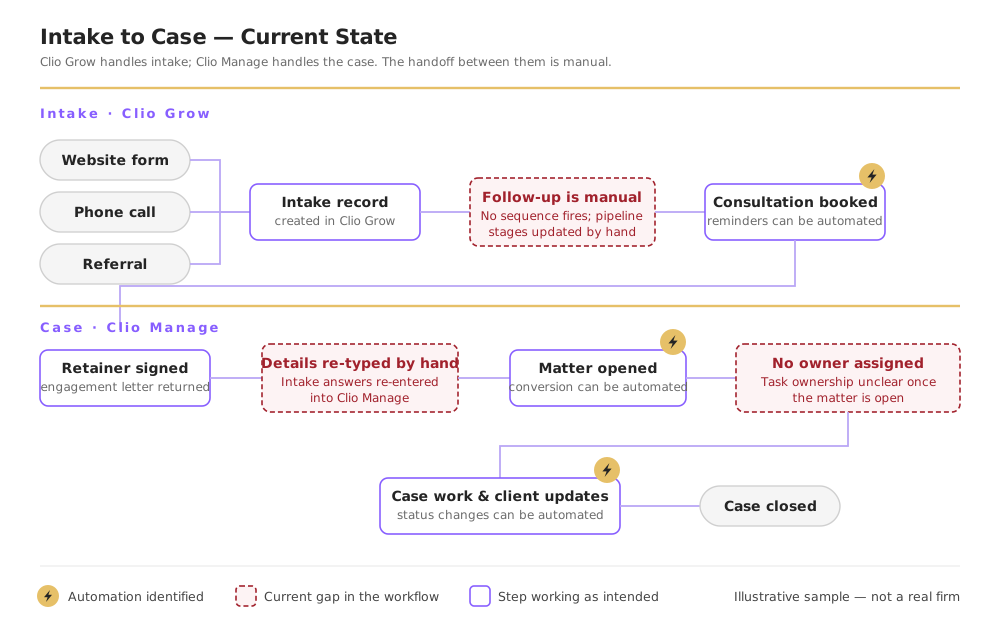
Automation Opportunities - Website to Intake
These automations cover the path from a first inquiry on your website to a booked consultation, so nothing depends on someone noticing a new lead.
What is an automation? An automation is a pre-built rule that tells your software to take a specific action when a specific event happens - without anyone on your team doing it manually. Automations eliminate repetitive tasks, reduce human error, and ensure nothing falls through the cracks regardless of who is working that day.
Example Automations from Your Tool Stack
The following are real examples of automations your firm can build inside your current tools. These are not hypothetical - they run inside your existing platforms today.
Consultation Scheduled - Intake Sequence
Trigger
Prospective client submits the intake form and books a consultation through Clio Grow.
What Happens Automatically
1Matter status changes from "New Inquiry" to "Consultation Scheduled."
2Prospect receives a confirmation email with appointment details and a pre-consult questionnaire.
3Task is created and assigned to the intake paralegal to review the submission before the call.
Result: Zero manual steps between form submission and call preparation. The intake paralegal walks into every consultation already briefed.
| Automation Name | Trigger | Automated Action | Tool | Business Impact | Priority |
|---|
| New Lead Received | Intake form submitted | Create matter, tag lead source, assign intake owner | Clio Grow | Prevents unassigned inquiries going cold | High |
| Consultation Reminder Sequence | Consultation booked | Automated email and SMS reminder at 24 hrs and 1 hr before the call | Clio Grow | Reduces no-shows and increases show rate | High |
Priority Key: High = Build first, highest time and revenue impact. Medium = Build in phase 2. Low = Nice to have, build last.